Guide to Campus Card — For International Students
Campus Card Introduction
The BLCU campus card is for personal identification and consumption of BLCU students and teaching staffs, which is required in the canteen, shower, payment, shops, library, and the transfer machines for charging your network account.
The Campus Card Center, affiliated to Informatization Office, is a department of BLCU in charge of campus cards. It is mainly responsible for the maintenance and management of campus cards, including data collection, card production, card issuance, card loss reporting, cancelling reported losses, cancelling the campus card accounts, and delivering consulting services.
1. Obtaining Your Campus Card
International students will receive their campus card once they have enrolled at the college. The first campus card is free of charge. Those who are late for enrollment should take your own valid identification documents (including passport, student ID, letter of admission, etc.) to get your campus card from their college office.
2. Conditions of Use
Always bring your campus card. Keep it properly and use it correctly. Do not bend, punch, or fold the card and keep it away from high temperature or wet places. A campus card is for the exclusive use of the individual to whom it was issued– it is non-transferable. If a card is loaned or given to anyone else, Informatization Office has the right to terminate the usage of the card and the card-authorized holder shall bear responsibility for all consequences.
Any lost or stolen campus card must be taken to the Campus Card Center in the Informatization Office (Room 134, Block B, Complex Building; the same below). Those in possession of other’s card will be punished by the university official, and may assume legal responsibility in serious circumstances.
3. Functions and Fee Scale
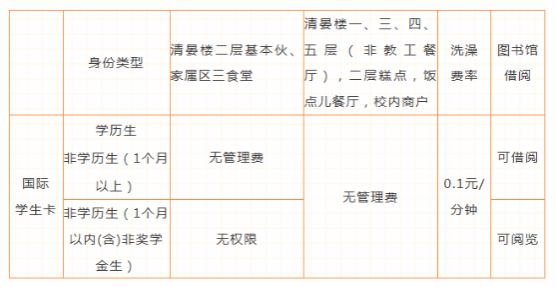
The rates for dining and shower consumption using the campus card are set by the Logistics Service Group.
The book borrowing and reading functions of the campus card are reviewed and activated by the library.
4. Campus Card Recharging
You can recharge your campus card by WeChat Pay, Alipay, using bank account transfer machine and self-service cash recharging machine and manual cash recharging service.
a. WeChat Pay: First, log in the BLCU Work WeChat account. Second, tap “校园卡服务”( Campus Card Services)and tap “业务办理” (Services) button. Then tap “微信充值” (Recharge by WeChat Pay) and then you can proceed to recharge your campus card.
b. Alipay: You can log in to Alipay on PC or APP, enter the web page of “校园” (Campus), click “我的校园卡”(My Campus Card)and recharge.
c. Transfer Machine: Bind the campus card to a Beijing ICBC debit card and recharge it by transferring.
d. Campus Card Self-service Cash Recharging Machine: You can use the self-service machine on the first floor of the canteen (Qingyan building清晏楼) to recharge your campus card.
e. Manual Cash Recharging Service: Recharge in the Qingyan Building or in the third canteen in the residential area.
After recharging the card through WeChat Pay or Alipay, you need to draw the money by swiping your campus card on the Consumer POS Machines or transfer machines on campus.
5. Campus Card Password
The campus card has two types of codes: consumption code and inquiry code.
The consumption code is needed for consumption, and transferring accounts . Note: small expenses do not need the code. Your consumption code is required when a single consumption or the daily consumption exceeds prior limitation. The prior limitation is specifically set in the case of loss of campus card.
The inquiry code is required when you report your campus card loss on the “Self-service” on BLCU Work WeChat account, and log into the Campus Card self-service website (http://ecard.blcu.edu.cn/selfsearch/).
Enter either the consumption code or the inquiry code can connect or unlink your Campus Card to your BLCU Work WeChat account.
Initially, the consumption code and inquiry password are the same. If you holds a Resident Identity Card, the initial code is the last six digits of the ID number (use 0 to replace X when the ID number ends with X); If you holds other identification documents (passports, servicemen's identity cards and so on), the initial code is the six-digits birthday number in the form of “yymmdd”. If the birthday data is incomplete, the initial code is “888888”.
6. Consumption Maximum Limits of Campus Card
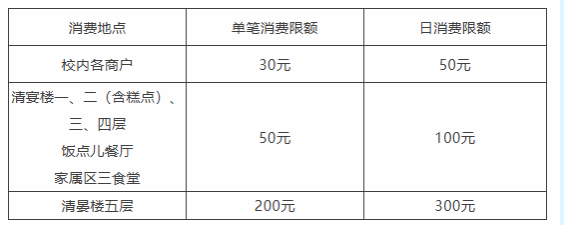
Single consumption limit and daily consumption limit are set to avoid the great loss after losing the campus card. The specific standards are as follows:
Note:
(1) The consumption limits of campus card are set by the Department of Logistics Support.
(2) If Meal Consumption Limit or Daily Consumption Limit exceeds the limit, the consumption password is required.
(3) Meal Consumption Limit refers to the sum of each consumption during a meal time period (breakfast, lunch and supper), and Daily Consumption Limit is the sum of all consumption on the day.
7. Reporting Campus Card Loss, Cancelling the Reported Loss, and Re-obtaining a New Campus Card
A. Reporting the loss of your campus card
If you lose your campus card, you can:
a. WeChat: Go to the BLCU Work WeChat account in your WeChat and tap “校园卡服务” (Campus Card Services). You will see a “卡挂失” (Reporting a Lost Campus Card) button in the “业务办理” (Operation) page;
b. Transfer Machine: Choose “自助挂失” (Self-service) in the “校园卡服务” (Campus Card Service) through transfer machine;
c. Digital BLCU:Login to Digital Beiyu - Resource Navigation - Campus Card System, and choose “自助挂失” (Self-service);
d. Self-reissuing Machine: Choose “自助挂失” (Self-service) to report;
e. Campus Card Cash Recharging Machine: Choose “自助挂失” (Self-service) to report;
f. Telephone: Call 82300062 to report the loss;
g. Manual service: Take your identity document and go to the Campus Card Center, Informatization Office to report the loss.
Note: Input the consumption password of your campus card when you report on the transfer machine, self-reissuing machine, and Campus Card Cash Recharging Machine. Input the inquiry password when you report on BLCU Work WeChat account and Digital BLCU.
B. Cancelling the reported loss
If you find your lost card, please take your identity documents and the campus card to the Campus Card Center, Informatization Office to cancel the reported loss of the card.
C. Re-obtaining a new campus card
If you lose or damage your campus card and need a new one, you can re-obtain it through self-service replacement or manual replacement.
a. Self-service Replacement
For Degree-Seeking Students (campus card isdeep green): Tap “自助补卡”(Self-service replacement) and follow the prompts on the screen to re-obtain a new campus card. The fee of getting a new card is 15 yuan and you can pay by using the balance or cash.
b. Manual Replacement
For International Students (including DegreeProgram and Non-Degree Program): You need to take your own identity documents to the Campus Card Center, Informatization Office and pay 15 Yuan for a new card.
If the damage is not man-made without no clear abrasion on the card surface, the cardholder can receive a new card for free.
After you obtain a new card, the old one will be invalid.
After obtaining the new campus card, the account balance will be available in real time with no separate withdrawal required.
8. The Validity Period and Extension of Campus Card
The period of validity of a campus card of international students depends on the duration of your study time at school.
The extension of a campus card of international students should be applied by the student themselves, and then verified by the office of students information management.
9. Campus Card Cancellation
After graduation, the campus card will not be collected. It will become an alumnus card with relevant rights without consumption function. The remaining balance can be drawn in the recharging place in Qingyan Building. Informatization Office will cancel the card records one year after the period of validity and the remaining balance will be treated as uncollectible and turned over to BLCU official.
10. Locations of Transfer Machines, Reissuing Machines and Cash Recharging Machines
Campus card transfer machines are located on the second floor of Qingyan Building, in the Library, on the first floor of Teaching Building 5, on the first floor of Dormitory Building 3, and on the western side of the lobby on the first floor of the Multifunctional Building (adjacent to ICBC).
Campus card reissuing machine is located on the western side of the lobby on the first floor of the Multifunctional Building (near the ICBC).
Cash recharging machine is located on the second floor of Qingyan Building.
11. Campus Card Self-service Platform
Website page: http://ecard.blcu.edu.cn/selfsearch/.The username is campus card ID. The password is campus card’s inquiry code. After login in, you can search for basic personal information, consumption details, recharging details, access details, etc.
12. Frequently Asked Questions
A. How to check the details of personal consumption?
Log in to BLCU Work WeChat account, Digital BLCU, campus card self-service platform, or transfer machine to check the details of personal consumption.
B. How to change the consumption code and inquiry code?
Consumption code can be changed by: taking valid identity documents and campus card to the Campus Card Center, Informatization Office to change the code, or use the campus card cash recharging machine, self-reissuing machine, transfer machine and POS machine to change the code.
Inquiry code can be changed by: taking effective identity documents and campus card to the Campus Card Center to change, or change the code via BLCU Work WeChat account or Digital BLCU.
C. What if the consumption or inquiry code was forgotten?
If you forget your consumption code, you can use the campus card cash recharging machine or self-reissuing machine to reset the code. Or, you can go to the Campus Card Center with your valid identity documents and your campus card to reset the code.
If you forget your inquiry code, you can use transfer machine, or Digital BLCU or login to campus card self-service website by clicking “忘记密码” (forget the code) to reset. Or, you can go to the one-stop service center with your valid identity documents and your campus card to reset the code.
D. How to change the consumption limit of my campus card?
The consumption limit includes a limit of single consumption and a limit of daily consumption. Both limits can be changed through the transfer machines on campus as follows:
a:Limit of single consumption: you can change it by choosing “change single consumption limit” in the “campus card service” on the transfer machine.
b: Limit of daily consumption: you can change it by choosing “change daily consumption limit” in the “campus card service” on the transfer machine.
Also, you can change the limits through the POS machines on campus as follow:
a: Limit of single consumption: put your campus card on the machine and press enter; enter your consumption code and press enter; choose “change single consumption limit” and press enter; enter the new limit and press enter.
b: Limit of daily consumption: put your campus card on the machine and press enter; enter your consumption code and press enter; choose “change daily consumption limit” and press enter; enter the new limit and press enter.
校园卡使用指南—国际学生
校园卡简介
北京语言大学校园卡是学校师生在校的通用身份识别卡和消费卡,主要用于食堂用餐、浴室洗浴、费用缴纳、超市消费、图书借阅、网费充值等。
校园卡管理中心是我校校园卡管理与服务机构,隶属于信息化办公室,主要负责校园一卡通系统的维护管理,校园卡(临时卡除外)的数据采集、制作、发放、挂失、解挂、补办、销户等卡务管理,以及培训咨询服务。
一、校园卡办理
新入学的国际学生的校园卡集中统一办理,来校报到时到所在学院领取,首张卡免费。晚报到的学生可持本人有效身份证件(护照、学生证、录取通知书等,下同)到所在学院领取。
二、校园卡使用
校园卡由持卡人随身携带,妥善保管,正确使用。请避免将卡弯曲、打孔、折叠及接触高温、潮湿,并保持卡面光洁。校园卡仅限本人使用,不得转借。如果转借,信息化办公室有权停止该校园卡的使用,所产生的后果由出借者本人承担。
凡是捡到他人丢失的校园卡时,请送交信息化办公室校园卡管理中心(地址:综合楼B座134,下同)。如盗用他人校园卡,经查证后送交学校有关部门处理,情节严重者将追究其法律责任。
三、校园卡的功能权限及收费标准

四、校园卡充值
目前,校园卡充值方式包括微信支付充值、支付宝充值、银行卡圈存、校园卡现金充值机充值、人工现金充值。
(1)微信支付充值:可登录北京语言大学微信企业号,进入“校园卡服务”,点击“业务办理—充值”进行充值;
(2)支付宝充值:可登录支付宝(PC端和手机客户端),搜索“支付宝校园卡”进行充值;
(3)银行卡圈存:可持校园卡在圈存机上绑定银行卡(仅限北京工商银行借记卡),进行转账圈存充值;
(4)校园卡现金充值机充值:可通过位于清晏楼二层的自助现金充值机进行充值;
(5)人工现金充值:可在清晏楼和家属区三食堂设立的充值点进行充值。
微信支付充值、支付宝充值成功后,需持校园卡到校内的消费POS机或圈存机上领取充值金额。
五、校园卡密码
校园卡设有两套密码:“消费密码”和“查询密码”。
消费密码是在消费、圈存转账时所使用的密码。注:小额消费不用密码。单笔或每日累计消费超过限额时需要输入消费密码。查询密码是在北语微信企业号挂失校园卡、登录自助服务网站(http://ecard.blcu.edu.cn/selfsearch/,下同)时所用的密码。
微信企业号绑定、解绑校园卡时,输入查询密码或消费密码均可。
消费和查询两套密码在初始时是相同的,即持居民身份证的持卡人,初始密码是身份证后6为,末位是X的用数字0代替;使用其他身份证件(护照、军官证等),初始密码为持卡人生日(6位,yymmdd);生日数据不全,初始密码为“888888”。
六、校园卡的消费限额
为了防止用户校园卡遗失后造成大的损失,校园卡设定了单笔消费限额和日消费限额,具体标准如下:
| 消费地点 | 单笔消费限额 | 日消费限额 |
校内各商户 | 30元 | 50元 |
清宴楼一、二(含糕点)、三、四层 | 50元 | 100元 |
清晏楼五层 | 200元 | 300元 |
【注】
①校园卡的消费限额由后勤服务集团负责设定;
②当单笔消费金额和日消费金额超出规定的限额时,需输入消费密码进行消费;
③餐限额和日限额都是累加的,餐限额是指一个就餐时间段(分早、中、晚餐)内各消费点的就餐总和,日限额是当天所有消费总和。
七、校园卡挂失、解挂及补办
1、挂失
如果不慎将校园卡丢失,可通过以下途径办理挂失:
(1)微信企业号挂失:登录北语微信企业号,进入“校园卡服务”,点击“业务办理—卡挂失”;
(2)圈存机挂失:点击圈存机“校园卡服务”中的“自助挂失”;
(3)数字北语挂失:登录数字北语—资源导航—校园卡系统,点击“自助挂失”;
(4)自助补卡机挂失:点击自助补卡机“自助挂失”;
(5)校园卡现金充值机挂失:点击现金充值机“自助挂失”;
(6)电话挂失:可致电82300062进行挂失;
(7)人工挂失:持有效身份证件前往一站式服务大厅挂失。
说明:使用圈存机、自助补卡机、校园卡现金充值机挂失时,“密码”为消费密码,使用微信企业号、数字北语挂失时,“密码”为查询密码。
2、解挂
如果挂失后校园卡又找回,请持有效身份证件和校园卡前往信息化办公室校园卡管理中心办理解挂业务。
3、补办
因丢失、损坏等原因补办新卡,可通过自助补卡或人工补卡方式进行补办:
(1)自助补卡
学历生(即使用深绿色校园卡的学生)在自助补卡机上点击“自助补卡”补办新卡,按照屏幕提示操作。补卡费用为15元,可通过卡余额或现金缴纳。
(2)人工补卡
国际学生(包括学历生和非学历生)须持本人有效证件,前往信息化办公室校园卡管理中心办理,并交纳工本费15元。补办新卡后,账户余额实时到账,无需单独领款
如果校园卡不明原因损坏,卡面没有明显磨损,可持有效身份证件和校园卡前往信息化办公室用户服务科免费换卡~
八、校园卡的有效期及延期
国际学生的校园卡有效期以实际学习时间为准。
国际学生的校园卡延期需由需由本人申请,学生学籍管理相关单位审核。
九、校园卡的中止注销
国际学生毕业离校时,其校园卡不回收,自动转为校友卡,卡消费功能失效,但享受校友卡相关权益。卡内余额可前往清晏楼的充值窗口取出。信息化办公室将在卡有效期过后一年注销其校园卡,并将校园卡内金额作为呆账,上缴学校。
十、校园卡圈存机、补卡机、现金充值机的位置分布
圈存机位置分布:清晏楼二层、图书馆、教5楼、学3楼、综合楼一层大厅西侧(紧邻工商银行)
补卡机:综合楼一层西侧(紧邻工商银行)
现金充值机:清晏楼二层
十一、校园卡自助查询平台介绍
网址:http://ecard.blcu.edu.cn/selfsearch/,用户名是校园卡号,密码是校园卡的查询密码,登录后,可查询校园卡个人基本信息、消费明细、充值明细、门禁进出明细等。
十二、常见问题
1、如何查询自己的消费明细?
可通过北语微信企业号、数字北语、校园卡自助查询平台、圈存机查询自己的消费明细。
2、如何修改消费密码和查询密码?
消费密码的修改方法:可通过现金充值机、自助补卡机、圈存机、POS机自助修改,也可携带有效身份证件和校园卡前往信息化办公室校园卡管理中心修改。
查询密码的修改办法:可通过北语微信企业号、数字北语自助修改,也可携带有效身份证件和校园卡前往信息化办公室校园卡管理中心修改。
3、消费或查询密码忘了怎么办?
忘记消费密码:可通过现金充值机、自助补卡机进行密码重置;也可携带有效身份证件和校园卡前往信息化办公室校园卡管理中心办理重置。
忘记查询密码:可通过圈存机、数字北语、校园卡自助查询平台登录页中“忘记密码”进行重置,也可携带有效身份证件和校园卡前往信息化办公室校园卡管理中心办理重置。
4、如何修改校园卡消费限额?
校园卡消费限额分为餐限额和日限额,均可在校园内的圈存机和消费POS机上修改。
圈存机修改流程如下:
(1)修改餐限额:通过圈存机“校园卡服务”中的“修改次限额”自助修改。
(2)修改日限额:通过圈存机“校园卡服务”中的“修改日限额”自助修改。
消费POS机修改流程如下:
(1)修改餐限额:首先把校园卡放在POS机上,按下键盘确认键;输入6位消费密码,按确认;在出现的选择项中选择“2. 修改卡上餐限额”,按确认;输入新的餐限额,按确认即可更新校园卡的餐限额。
(2)修改日限额:首先把校园卡放在POS机上,按下键盘确认键;输入6位消费密码,按确认;在出现的选择项中选择“3. 修改卡上日限额”,按确认;输入新的日限额,按确认即可更新校园卡的日限额。
若英文译本与中文有异,以中文版本为准。
本文修订时间:2026年4月30日

“北语信息化”微信公众平台
微信企业号
联系电话:82300062 | 工作时间:周一至周五 8:00-11:30 13:00-17:00
办公地点:综合楼B座130、134室 | QQ群:123595213
版权所有© 2024 北京语言大学 信息化办公室
